
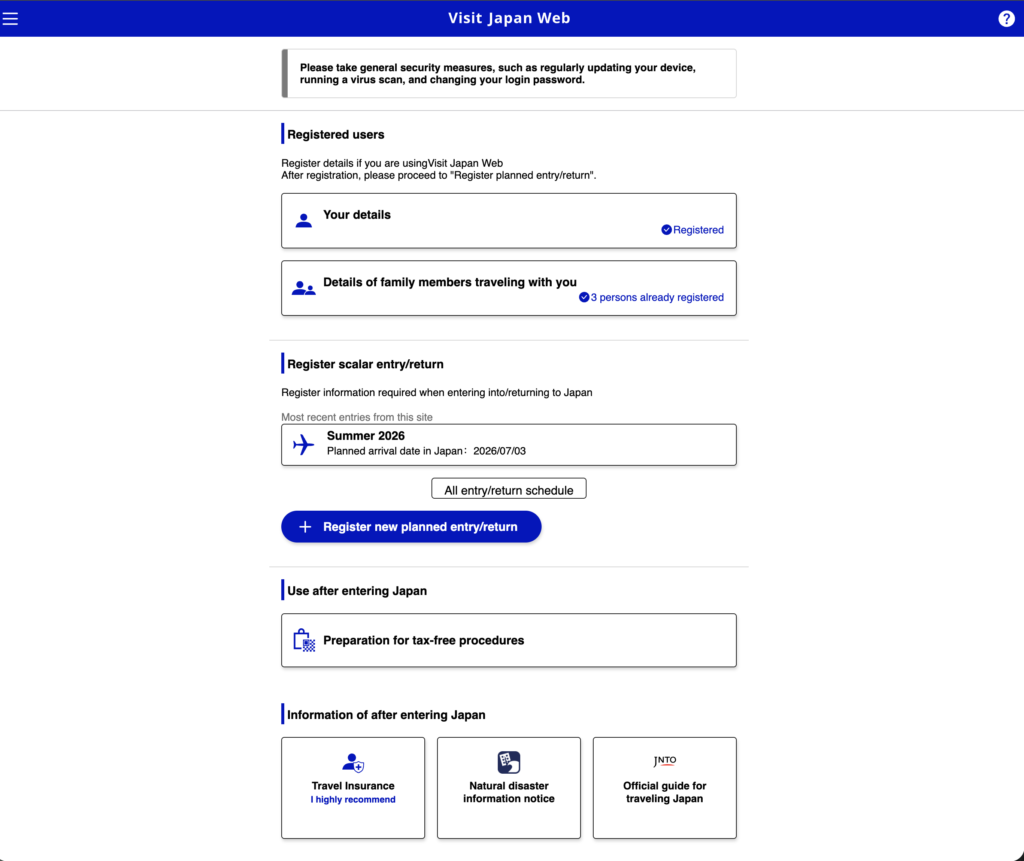
I’m going to be honest about my first reaction to Visit Japan Web: I thought it was a scam.
Someone recommended it before our trip to Japan this summer. I pulled up the website, saw a URL I didn’t recognize, and found a plain-looking government form asking for my passport number. Every instinct I’ve developed from years of phishing emails said, Close this tab.
I’m glad I didn’t.
Visit Japan Web is an official Japanese government service, and it is completely free. That website turned out to be the single best fifteen minutes of trip preparation I did—and it helped our family of four get through the arrival process while plenty of other travelers were still dealing with paper forms.
Is Visit Japan Web Legit?
Yes. Visit Japan Web is the Japanese government’s official online system for completing immigration and customs information before you arrive in Japan.
You fill it out before your flight, and the system generates a QR code for each traveler. At the airport, you show or scan those codes during the immigration and customs process instead of relying entirely on paper forms.
It is not an app you need to purchase, and there is no application or processing fee.
The official Visit Japan Web information page is:
services.digital.go.jp/en/visit-japan-web
The service is operated by Japan’s Digital Agency. If a website asks you to pay to register for Visit Japan Web, you are not using the official service.
Why It Looked Sketchy—and Why It Isn’t
Here’s the thing that may trip up Americans: Japanese government websites end in .go.jp, not .gov.
That means an address such as “digital.go.jp” can look like a knockoff to American eyes when it is actually an official Japanese government domain.
What you need to avoid are unofficial websites and suspicious apps that imitate Visit Japan Web and charge a “processing fee” to complete the free government form for you. The Japanese government does not charge travelers to use Visit Japan Web.
If anyone asks you for payment, close the page and return to the official site.
What Visit Japan Web Replaces
Without Visit Japan Web, you may need to complete an immigration arrival card and a customs declaration using paper forms.
That can mean filling them out on the airplane when you’re tired and cramped, or trying to complete them after landing while standing in an arrivals hall with everyone else who postponed the paperwork.
Visit Japan Web lets you enter the same basic information before your trip, while you’re sitting comfortably at home and have your passports, flight details, and hotel reservation in front of you.
How to Complete Visit Japan Web
I recommend doing this about a week or two before your flight. Gather your passports, flight number, arrival date, and the name and address of your first hotel.
Go to the official Visit Japan Web site. Create an account using your email address and a password, and then enter the verification code sent to your email.
Enter your personal information. Add your passport information and the other basic details requested by the system.
Add the family members traveling with you. This made the process much easier with children. Family members traveling together can be registered through one account instead of requiring everyone to maintain a separate login. I entered all four members of our family in one sitting.
Register your trip. Enter your arrival date, airline and flight number, and the name and address of your first accommodation in Japan. Keep your hotel confirmation open in another tab so you can copy and paste the information.
Complete the immigration and customs questions. The system asks about matters such as your purpose for visiting, intended length of stay, and customs declaration.
Display each traveler’s QR code. Once the required immigration and customs information has been completed, return to the trip’s procedure page and select Display QR code. The unified QR code contains information for both immigration and customs. Each traveler has an individual code.
Screenshot every code before boarding. Save each QR code to your phone’s photo library. Do not assume that airport Wi-Fi, international cellular service, or the website will cooperate after a long flight. A screenshot in your camera roll does not need an internet connection.
“I Registered, but I Can’t Find My QR Code”
This is one of the most common Visit Japan Web problems, so let me save you some unnecessary panic.
The QR code is not necessarily emailed to you, and it does not sit prominently on the account’s main screen.
Log in to Visit Japan Web and open your registered trip. Go to the Japan entry/return procedure page and look for the Display QR code option.
If you cannot find it, check whether you completed all the required immigration and customs information. Completing only part of the process may leave you without a finished code.
Go back through the procedure, finish anything marked incomplete, and then return to the QR-code display area.
What Actually Happened at Narita Airport
Here’s how it played out for us after landing at Narita Airport on a Friday afternoon in July with two kids, following a direct flight from Houston.
We followed the signs and the crowd toward immigration. Airport employees were directing arriving passengers toward the appropriate lines and machines.
One airport staffer helped point us in the right direction. His English was limited, our Japanese was nonexistent, and it did not matter. He saw the QR code on my phone, pointed us where we needed to go, and kept everything moving with the kind of patient efficiency we repeatedly encountered in Japan.
At the machines, each family member used an individual QR code and passport. The adults completed the required photograph and fingerprint steps. After immigration, we collected our luggage and continued through customs using the same Visit Japan Web code.
From picking up our bags to walking out of the airport was genuinely quick. Not merely “quick for an airport.” Quick.
That was especially valuable with two tired children coming off a trans-Pacific flight.
Does One Scan Complete Immigration and Customs?
Visit Japan Web now provides one unified QR code containing the information needed for both immigration and customs. Depending on the airport and terminal, however, you may still use that code at more than one point during the arrival process.
Integrated kiosks that collect information for immigration and customs together are available at Narita Airport Terminal 3, Haneda Airport, Kansai International Airport, and Fukuoka Airport.
Other terminals and airports may continue to handle immigration and customs as separate steps. The important part is that you can use the same Visit Japan Web QR code for both procedures.
A Few Things Worth Knowing
Visit Japan Web is optional. Travelers can still complete the necessary procedures without it. However, completing your information before you arrive can make the airport process considerably easier.
Children need individual codes too. Each traveler has their own QR code, including children. When everyone is registered under your account, you can switch between family members and pull up each person’s code as you proceed.
Screenshot the codes. This deserves repeating. Take a screenshot of every family member’s QR code before you board your flight. Put them in the order you expect to use them, or mark each image with the traveler’s name so you’re not fumbling through identical-looking squares at immigration.
You may see a tax-free shopping section. That feature is separate from the immigration and customs procedures. Japan is scheduled to introduce a refund-based tax-free shopping system in November 2026, under which eligible consumption tax refunds will generally occur after customs confirmation when travelers depart Japan. Procedures may continue to evolve, so concentrate first on completing the immigration and customs portions required for your arrival.
A new trip requires a new registration. Visit Japan Web may retain some of your account and traveler information, but you must register the details of each new trip and generate the appropriate current QR codes.
The Bottom Line
Fifteen minutes on a website I initially thought was a phishing attempt turned out to be one of the smartest things I did before our Japan trip.
It helped make the difference between beginning our vacation at the airport exit and beginning it in a paperwork line. With two kids coming off a trans-Pacific flight, that isn’t merely a convenience. It’s a rescue.
If Japan is on your calendar, complete Visit Japan Web before you fly, make sure every traveler’s information is finished, and screenshot all the QR codes before boarding.
You’ll thank yourself when you land.
And once you’re there, Japan has a few more surprises waiting in unexpected places—starting with the bathroom. I went in thinking bidets were gross. I came home shopping for one.
Entry requirements and procedures can change. Always confirm current information through the official Visit Japan Web site before traveling. This post reflects our family’s experience in July 2026 and is not legal or immigration advice.